


The Truth Nobody Tells You: Your Client Judges Your Company Before Reading a Single Word
They judge it the moment they touch your paper.
Picture this: you spent time and money on a professional brochure design, and when it reached your client’s hands, it bent on the first touch, the colors looked nothing like your original design, or the text bled through the back. In that moment, the designer didn’t fail. The paper did.
Paper types for printing aren’t a minor detail left to the printer, they’re a strategic decision that directly affects your print quality, brand image, production cost, and even how long your printed material lasts.
At Dar Medhat El Sewedy, with over 27 years of experience producing millions of print pieces for major companies across the Middle East, we’ve put everything you need in this guide: the most common paper types and their properties, classification by weight, thickness and finish, best A4 paper options, business card paper, offset paper, a full comparison table, and the most common mistakes that waste marketing budgets, all clear, no fluff.
The right paper decision starts here, what you find will save you a lot before your next print order. ⬇️
Why Choosing the Right Paper Matters
-
Paper Is Part of Your Marketing Message
Your marketing message doesn’t start with the design, it starts with the paper. Before your client reads a single word, their hands have already made a judgment.
Thin paper says “cheap and fast.” Thick, smooth paper says “a company that cares about details.” That judgment happens in under a second, and you don’t get a second chance to change it.
-
How Paper Type Affects Your Client’s Impression
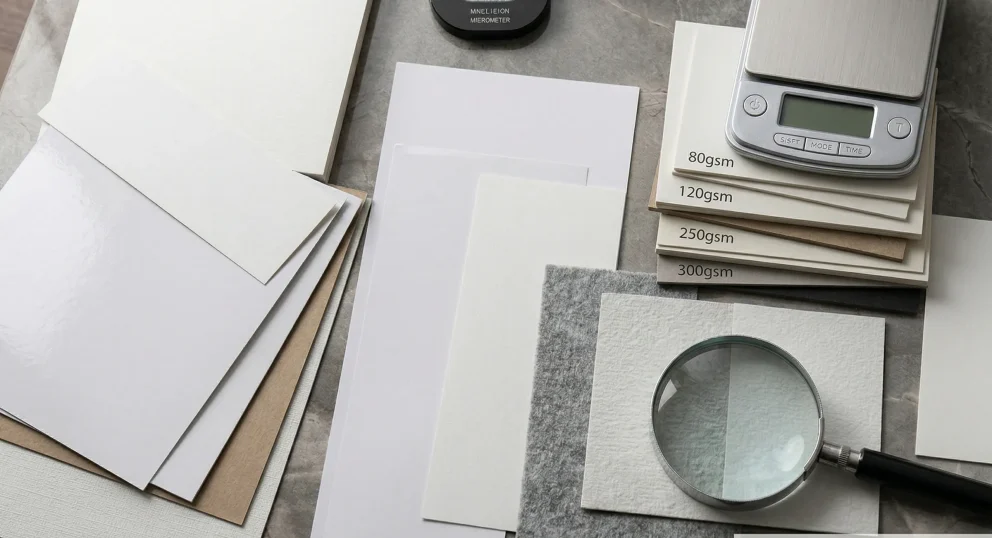
Paper weight is measured in GSM, Grams per Square Meter. This number isn’t just about heaviness. It reflects density, rigidity, and how the paper absorbs ink.
Choosing 300gsm for your company brochure sends a message: “We’re an established business that values quality.” Heavier paper communicates luxury and professionalism. Lighter paper communicates speed, economy, and wide distribution. Both are valid, but each has its place.
Expert Tip: Paper texture is your first handshake with the client, make it a strong one.
-
Paper Type and Perceived Value
The same design on two different papers is perceived at two different price points. A product wrapped in thick premium paper instinctively feels like it’s worth more, the client can’t explain why, but they always feel the difference.
A 350gsm business card with Soft Touch gets kept. A 200gsm card gets thrown away at the end of the day. Same information, two completely different outcomes.
-
Impact on Production and Shipping Cost
Heavier paper means higher production and shipping costs, especially at large quantities. The smart decision is balancing purpose with budget.
Flyers for mass street distribution? Go light. A catalog for an important client? Don’t compromise on quality.
Common Mistake: Always choosing the heaviest paper available thinking it’s always better. The right choice is the appropriate weight for the purpose, not the heaviest, not the lightest, but the smartest.
Key Technical Properties of Printing Paper
Before choosing a paper type, five technical properties determine whether it’s right for your print job:
| Property | What It Is | Why It Matters |
| Weight (GSM) | Weight of one square meter of paper | Determines rigidity and feel, higher number means more rigidity, more luxury, higher cost |
| Thickness (Caliper) | Actual paper thickness in microns | Weight and thickness aren’t the same, 300gsm coated is thinner than 300gsm uncoated due to fiber density |
| Whiteness & Opacity | How white the paper is and how well it blocks show-through | Low opacity means text and images bleed through to the other side, a common problem with lighter weights |
| Smoothness | Surface texture | Smooth surface keeps ink on top, colors are sharp and vivid. Rough surface absorbs ink into fibers, colors are softer and more natural |
| Ink Absorption | How much ink the paper absorbs into its fibers | High absorption = dull colors. Coated paper = ink stays on surface = vivid colors |
Bottom line: The ideal paper balances these five properties to serve your goal, not the most expensive, not the cheapest, but the most suitable.
Paper Types by Classification
Not every paper suits every print job. The wrong choice means dull colors, paper that bends in hand, or a design that shows through the back, and you won’t know until after the full quantity is printed.
At El Sewedy we classify paper from three angles: surface finish, weight, and type, because each angle answers a different question. Finish answers “how will the colors look?” Weight answers “how rigid will the print be?” Type answers “what material suits my purpose?”
Understanding all three together is what makes your decision right from the start.
A. Classification by Surface Finish
Glossy Coated Paper
Reflects light and makes colors appear more vibrant and contrasted. Photos print sharp and eye-catching.
Best for: Product catalogs, automotive and real estate brochures, food and beauty marketing materials.
Available weights: 115 — 170 — 250 — 300gsm.
Note: Glossy paper is difficult to write on with a pen — keep that in mind if your client will be adding notes to the print.
Matte Coated Paper
Doesn’t reflect light. Gives a quiet, refined feel. Long text is significantly easier to read than on glossy.
Best for: Corporate reports, premium business cards, clinic and law firm brochures.
Available weights: 115 — 170 — 250 — 300 — 350gsm.
Expert Tip: Matte with Spot UV on the logo only = the perfect combination of elegance and distinction.
Semi-Gloss / Silk Paper
The middle ground between glossy and matte. Vivid colors without the distracting light reflection. Many prefer it because it combines the best of both.
Best for: Company magazines, multi-purpose brochures, fashion catalogs.
Available weights: 115 — 170 — 250gsm.
Uncoated Paper (Offset)
The everyday paper we write on. Absorbs ink deep into its fibers, giving it a natural, warm character.
Best for: Official correspondence, books, notebooks, invoices.
Available weights: 70 — 80 — 90 — 100 — 120gsm.
Common Mistake: Printing high-quality product photos on uncoated offset paper, colors will come out dull because the paper absorbs the ink instead of keeping it on the surface.
B. Classification by Weight
Lightweight Paper (70–100gsm)
Uses: Office paper, mass-distribution flyers, internal documents.
Advantages: Low cost, ideal for very large quantities.
Limitations: Shows print-through when printed on both sides. Not suitable for professional brochures.
Expert Tip: Use it for mass distribution on streets and in malls, not for important clients.
Medium Weight Paper (115–170gsm)
Uses: Brochures, leaflets, multi-page catalogs.
Advantages: Flexible enough to fold without cracking, thick enough to prevent show-through, good balance between quality and cost.
Limitations: Not the best choice for business cards or luxury print materials.
Expert Tip: 150gsm coated is the smartest choice for most brochures, high quality at a reasonable cost.
Heavyweight Paper (200–350gsm)
Uses: Business cards, catalog covers, restaurant menus, packaging boxes.
Advantages: Real rigidity, premium feel in hand, doesn’t bend or damage easily.
Limitations: Cannot be folded without scoring (Rilling) first, without it, the ink cracks and leaves white lines at the fold.
Expert Tip: Business cards should never go below 300gsm, anything lighter bends in the wallet and creates an immediately negative impression.
C. Most Common Paper Types
Standard Paper
The familiar white paper in every office. Common weight 80gsm, uncoated surface, absorbs ink quickly.
Uses: Daily office printing, letters, invoices, internal documents.
Coated Paper (Kosheh)
The most widely used paper in professional commercial printing. The kaolin coating prevents excess ink absorption and keeps colors sharp and clear.
Glossy vs Matte: Glossy reflects light and makes photos pop. Matte is quieter and more refined for text-heavy content.
Uses: Brochures, catalogs, business cards, all types of marketing materials.
Duplex Board
Double-layered paper, one coated smooth side and one uncoated grey or brown back. Rigid and more affordable than pure cardboard.
Uses: Light packaging boxes, book covers, promotional cards.
Art Paper
A premium grade of coated paper with exceptional print quality. Colors are more vivid and details sharper than standard coated paper.
Uses: Fashion and jewelry catalogs, luxury hotel materials, art exhibition prints.
Brown Kraft Paper
Brown, natural-looking paper with a warm, authentic character. Strong and durable, communicates sustainability and craftsmanship.
Uses: Gift wrapping, shopping bags, eco and food brand materials.
White Kraft Paper
Same durability as brown kraft, but the white surface allows for brighter, more vivid print colors.
Uses: Premium shopping bags, upscale restaurant packaging, white gift boxes.
White Board (Cardboard)
Rigid cardboard with a white coated surface. Heavier and stiffer than standard coated paper.
Uses: Cosmetic boxes, pharmaceutical packaging, premium food product packaging.
Metallic Board (Gold & Silver)
Cardboard with a shiny metallic surface, gold or silver. Creates an exceptional visual presence that’s impossible to ignore on the shelf.
Uses: Luxury chocolate and confectionery boxes, cosmetics, seasonal gifts, VIP business cards.
Corrugated Paper
Multiple paper layers with a wavy middle layer that provides excellent cushioning and strong protection.
Uses: Shipping boxes and outer packaging, protecting fragile products during transit.
Wood-Free Paper
Made from plant fibers without wood pulp, brighter white, longer lifespan, and doesn’t yellow over time.
Uses: Books and scientific references, official and legal documents, any print meant to last.
A4 Paper Types for Printing
A4 is the world’s most commonly used paper size, but not all A4 paper is equal. The same size comes in completely different weights and qualities, each suited to a specific purpose.
The simple rule: Size = dimensions. Weight = quality.
Best A4 Paper for Home and Office Printing
- 80gsm offset: The most common choice for office printers. Affordable, works with all printers, suitable for daily documents.
- 90gsm offset: Slightly thicker, clearer colors, better for internal reports and presentations.
- 100gsm offset: The best option for internal printing that needs a better look, formal letters and important documents.
Expert Tip: For home printers, don’t exceed 100gsm, heavier weights can cause paper jams.
Best A4 Paper for Commercial Printing
- 115–135gsm coated: Ideal for simple flyers and ads. Vivid colors at a reasonable price.
- 150–170gsm coated: The best option for brochures and leaflets. Good rigidity with enough flexibility to fold.
- 200–250gsm coated: For more professional print, company presentations, client files, exhibition materials.
Comparison Table: Weight vs Use in A4
| Weight | Type | Best For | Suitable Printer |
| 80gsm | Offset | Daily office printing | Home / Office |
| 90gsm | Offset | Internal reports and presentations | Home / Office |
| 100gsm | Offset | Formal letters and documents | Office |
| 115gsm | Coated | Simple flyers | Commercial digital |
| 150gsm | Coated | Brochures and leaflets | Digital / Offset |
| 200gsm | Coated | Company presentations | Digital / Offset |
| 250gsm | Coated | Premium professional materials | Digital / Offset |
Business Card Paper Types
A business card is small, but the paper decision is big. The wrong paper makes it bend in the wallet or get thrown away by end of day. The right paper makes it worth keeping for years.
Business cards need completely different paper from other print materials. Want to know everything about professional business card printing? Read our complete business card printing guide.
The minimum for business cards is 300gsm, anything below that bends in the wallet and creates an immediately negative impression.
- Coated Paper: The most popular classic choice. Vivid colors, sharp details, available from 300 to 400gsm. Accepts all finishes, lamination, Spot UV, and foiling.
Best for: All industries, the right starting point for any brand.
- Kraft Paper: Warm and authentic, communicates sustainability and craftsmanship. Its natural brown color makes it stand out without any additional finishing.
Best for: Specialty coffee shops, artisan brands, eco-conscious businesses.
- Cotton Paper: A fabric-like texture, luxurious, authentic, and doesn’t yellow over time. Communicates establishment and high professionalism.
Best for: Lawyers, financial consultants, and high-end professions that need to build trust.
- Translucent Paper: Partial transparency creates a unique visual layering effect. Distinctive and memorable.
Best for: Designers, artists, and creative fields that want a card that reflects their personality.
- Metallic Board: Distinctive metallic sheen creates an exceptional visual presence. With White Ink or Hot Foil it becomes a card that’s nearly impossible to forget.
Best for: Tech companies, luxury hotels, premium segment brands.
- PVC (Plastic): Doesn’t bend, doesn’t damage, unaffected by moisture, lasts years exactly as it is. Available clear or colored.
Best for: Tech companies, hospitality sector, any brand that wants to say “we’re different.”
Quick Comparison Table
| Paper Type | Impression | Best For | Luxury Level |
| Coated | Professional & classic | All industries | ⭐⭐⭐ |
| Kraft | Warm & authentic | Eco and artisan brands | ⭐⭐ |
| Cotton | Luxurious & established | High-end professions | ⭐⭐⭐⭐ |
| Translucent | Creative & distinctive | Creative fields | ⭐⭐⭐ |
| Metallic | Striking luxury | Premium brands | ⭐⭐⭐⭐⭐ |
| PVC | Modern & durable | Tech and hospitality | ⭐⭐⭐⭐ |
How to Choose the Right Paper for Your Project
Paper selection isn’t guesswork, it’s a logical decision in 4 steps. Follow them in order and you’ll reach the right answer in minutes.
Step 1: Define Your Print Goal
Wide, fast distribution: Mass flyers and ads, go light (90–115gsm). Lower cost lets you print more and reach further.
Direct sales: Brochures and catalogs presented to clients, go medium (150–170gsm). Quality that convinces at a reasonable cost.
Luxury presentation: Materials representing your company at important meetings or exhibitions, don’t go below 300gsm with matte lamination.
Repeated use: Restaurant menus, membership cards, daily-use materials, choose 350gsm with heavy lamination or PVC.
Step 2: Decide on Print Method
Offset: Handles light and medium weights brilliantly at large quantities. Most economical from 1,000 copies upward.
Digital: Excels with heavy weights and small quantities. Ideal for 50 to 500 copies with high quality.
The rule: Large quantity + light paper = offset. Small quantity + heavy paper = digital.
Step 3: Factor in Your Budget
Large quantities, limited budget: Choose 115–150gsm coated with offset. Excellent quality at the lowest cost per unit.
Small quantities, higher budget: Choose 300–350gsm with digital and a distinctive finish. The quality justifies the price.
The smart formula: 150gsm with Soft Touch outperforms 300gsm with no finishing at all, finishing raises perceived value more than weight alone.
Step 4: Think About Finishing
Lamination: Adds thickness and protection. 250gsm with heavy lamination feels like 300gsm, factor that into your decision.
Spot UV: Needs a solid surface to apply correctly. Don’t go below 300gsm when using it.
Folding and Scoring: Any paper above 200gsm needs scoring before folding, without it, ink cracks and leaves white distorted lines at the fold.
Summary: Define the goal first, then quantity, then budget, then finishing, and the right paper will practically choose itself.
Common Mistakes When Choosing Paper and How to Avoid Them
From 27 years of printing experience, these mistakes repeat constantly, and all of them cost money that could easily be saved with one right decision from the start.
Mistake 1: Printing high-quality photos on uncoated paper: Uncoated paper absorbs ink into its fibers. Your product photos come out dull and look nothing like the original design.
Solution: Any print with professional color photography needs coated paper, glossy or matte.
Mistake 2: Folding 300gsm paper without scoring first: Heavy paper doesn’t fold directly. Without prior scoring on the fold line, ink cracks and white distorted lines appear, ruining the brochure.
Solution: Any paper above 200gsm needs scoring before folding, confirm the printer includes it in the order.
Mistake 3: Using lightweight paper for daily-use menus: A menu gets handled dozens of times a day. 150gsm without lamination will look worn and damaged within a week.
Solution: Menus should be minimum 350gsm with heavy lamination or plastic coating to withstand daily use and cleaning.
Mistake 4: Choosing based on price alone: The cheapest available paper isn’t always the smartest choice. A cheap-paper brochure for an important client costs you the entire deal, far more expensive than the difference in paper price.
Solution: Always ask “who is this print reaching?”, the answer defines the logical paper budget.
Mistake 5: Ignoring show-through in lightweight papers: Paper below 100gsm is partially transparent. Print on both sides and the back will show through the front, making it unreadable.
Solution: For double-sided printing, don’t go below 115gsm coated, if color areas are very dark, choose 150gsm.
Mistake 6: Not requesting a sample before the full print run: Imagine printing 5,000 brochures and discovering the color doesn’t match your expectations or the paper feels lighter than you imagined.
Solution: Always request a Sample Print before approving the full quantity, this small step can save you a complete loss.
The bottom line: Most printing mistakes happen before the machine starts, in the moment of choosing the paper. Take your time on this decision and consult an expert if you’re not sure.
Professional Tips for the Best Print Results
Five simple tips that separate a successful print job from one that needs to be redone from scratch.
- Always request samples before final printing: What you see on screen always differs from what comes off the machine, a sample settles the matter before you lose your entire budget.
- Verify your file is in CMYK, not RGB: Screens display colors that ink cannot reproduce on paper, what you see on screen won’t necessarily appear in the final print.
- Factor paper weight into shipping cost calculations: Heavier paper means higher shipping weight, especially at large quantities. Calculate shipping into your budget before making the final weight decision.
- Test the fold before printing large quantities: If your print involves folding, request a paper mock-up and test the fold before going to print. This reveals in advance whether the paper needs scoring or whether the weight is unsuitable for the fold lines.
- Consult a print expert before making your final decision: A print expert sees every day what works and what doesn’t, and saves you mistakes that cost far more than the time it takes to ask.
At Dar Medhat El Sewedy, consultation is always free, contact us before any print decision and we’ll help you choose the right paper for your project from the very first time.
Frequently Asked Questions
What’s the difference between coated and uncoated (offset) paper?
Coated paper has a smooth surface coating that keeps colors sharp and vivid, ideal for brochures and photos. Uncoated absorbs ink into its fibers, ideal for books, letters, and documents. Simply: photos and colors = coated. Text and documents = uncoated.
Is heavier paper always better?
No. Heavier is better for business cards and luxury print, but for brochures with multiple folds, heavy paper makes them bulky and hard to close. The smarter choice is the weight appropriate for the purpose, not always the heaviest.
What paper weight is right for a menu?
Minimum 350gsm with heavy lamination or plastic coating. A menu gets handled dozens of times daily and is exposed to moisture, anything lighter will deteriorate within weeks.
What’s the best paper for brochures?
150gsm coated for standard brochures. 170–200gsm for professional brochures. Glossy for product and photo-heavy content, matte for corporate and service-based content. This choice covers 90% of cases.
What’s the best paper for business cards?
Minimum 300gsm. For premium cards, 350gsm with Soft Touch or Spot UV. For truly distinctive cards, Metallic Board or Cotton. Anything below 300gsm bends in the wallet and creates a negative impression.
What’s the difference between glossy and matte coated paper?
Glossy reflects light and makes photos and colors more vivid, ideal for products, food, and automotive. Matte doesn’t reflect light and gives a quiet, refined feel, ideal for corporate, medical, and legal firms. Same quality, two completely different messages.
What paper weight is right for A4 printing?
For daily office use: 80gsm. For internal reports and presentations: 90–100gsm. For commercial flyers: 115–135gsm. For professional brochures and marketing materials: 150–200gsm.
Final Word
Choosing paper isn’t a detail, it’s the decision that determines whether your print gets kept or thrown away, whether it reflects your company’s value or diminishes it, and whether it saves your budget or wastes it.
Three things to always remember:
- Purpose first: Wide distribution = light paper. Direct sales = medium. Luxury presentation = heavy with finishing.
- Weight isn’t everything: 150gsm with Soft Touch outperforms 300gsm with no finishing at all.
- Sample before quantity: One minute reviewing a sample saves you a complete loss.
At Dar Medhat El Sewedy, we help you make this decision with confidence. From over 27 years of executing millions of print pieces, we know exactly which paper suits which print job, and which choice balances your quality with your budget.
Don’t leave your paper decision to chance, contact us now for a free consultation and a custom quote for your print materials. ⬇️