


In just a few seconds, a customer forms a complete impression of your restaurant through the menu, is it professional? Does it reflect the quality of the food? Is this place worth trying? The texture, the colors, the clarity of the food photography, the way dishes are presented, all of it directly influences the decision to order.
In the restaurant business, a menu isn’t a price list. It’s a sales tool. A well-designed, professionally printed menu can direct a customer’s eye toward higher-margin dishes, raise the average check size, and make the ordering experience smoother and more convincing.
The opposite is equally true, a weak menu quietly loses sales every single day without you noticing.
Professional restaurant menu printing is no longer a formality. It’s a strategic decision that affects revenue, customer experience, and brand perception.
This guide covers everything you need to make the right call: the best materials, finish options, printing choices, pricing factors, common mistakes, and practical advice drawn from producing thousands of menus for restaurants across every category.
If you want a menu that doesn’t just display your dishes, but sells them, you’re in the right place.
Why a Professional Menu Directly Affects Customer Experience and Revenue
The menu is the first real point of interaction between a customer and your restaurant. In under two minutes, a customer reads through it, but what they’re actually doing is forming a complete impression of the place: the quality, the cleanliness, and even whether the food is worth the price.
The Menu Is Your Silent Salesperson
Before the waiter speaks. Before the smell of the kitchen reaches the table. The customer is holding your menu, and making judgments in that exact moment.
Research in menu engineering confirms that how dishes are presented, and the quality of the print itself, directly influences purchase decisions.
A menu printed on poor-quality stock lowers the perceived value of the food, even when the food is exceptional. A professional menu makes the same dish appear more premium and more worth ordering.
Studies also show that customers spend less than 109 seconds reading a menu before placing their order. In that window, their entire impression of your restaurant is formed.
Paper that feels rough or cheap lowers the mental value of the food before a single bite. The reverse is equally true: a premium menu with quality materials raises expectations and makes customers willing to spend more before they even look at the prices.
The Numbers Back It Up
Investing in a professional menu can raise average check size by up to 15%, because a well-structured menu guides customers toward higher-margin dishes without them ever feeling directed.
The Menu Reflects Your Kitchen Before Anyone Sees It
A worn, tired menu tells your customer: “If they don’t care about what they put in my hands, why would they care about what they put on my plate?”
A professional menu signals a clean kitchen, quality ingredients, and an owner who cares about every detail. That impression is built before the first bite, and it can be the deciding factor between a customer who stays and one who leaves.
A Menu That Holds Up to Daily Use
A successful restaurant means a menu handled dozens of times a day, by different hands, in different conditions. Standard paper without the right finish looks worn within weeks. And a worn menu sitting on the table sends a negative message every single day it stays there.
The right material and finish keeps your menu looking like new for months, even in the most demanding environments.
Al-Suwaidi’s Note: A menu isn’t a cost, it’s an investment that pays back with every order. A restaurant with a professional menu sells more, projects a better image, and builds stronger trust. The price difference between a basic and a professional menu is far less than the value of the additional orders it brings in.
Types of Menus Available at Madhat Al-Suwaidi Printing House
Not every restaurant needs the same menu. A café is different from a fine dining restaurant; a delivery operation is different from a five-star hotel. The right choice depends on your brand identity, your customers, and how intensively the menu will be used daily.
1. Laminated Printed Menu
The most widely used and smartest option for high-traffic restaurants. 300gsm or 350gsm coated stock with thermal lamination makes it completely resistant to liquids and oils, wipes clean in one pass and looks brand new every time.
Matte vs. Glossy? Matte delivers a quiet, upscale feel and eliminates glare from interior lighting, making it more comfortable to read. Glossy makes food photos pop with vivid, appetizing color.
Al-Suwaidi’s Note: If your restaurant has warm or dim lighting, go matte. Glare from a glossy menu in that environment is genuinely uncomfortable to read, and that’s a bad experience before the food even arrives.
Best for: Fast casual restaurants, cafés, neighborhood restaurants, any establishment that needs a menu built for daily heavy use.
2. Multi-Page Booklet Menu
For restaurants with extensive offerings, starters, mains, desserts, beverages, the booklet gives you the space to present each section with photos and descriptions without crowding.
Binding options:
- Saddle Stitch: Economical and fast. Ideal for large quantities and menus that get updated frequently.
- Wire-O Binding: Opens completely flat. More professional appearance, longer-lasting. The right choice for upscale restaurants.
Al-Suwaidi’s Note: Interior pages should be no lighter than 170gsm. Below that, pages crack with repeated turning and feel cheap in the hand.
Best for: Full-service restaurants, fine dining, hotels, large restaurant chains.
3. Hardcover Luxury Menu
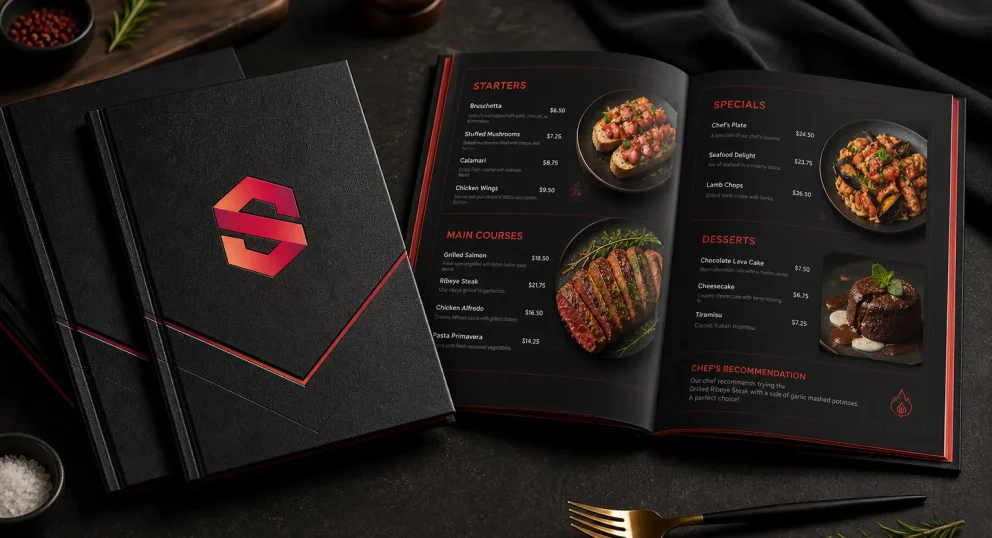
A rigid cover wrapped in genuine or synthetic leather, or premium fabric, with exceptionally printed interior pages. The moment a customer picks it up, they know this restaurant is different, before reading a single word.
The cover can be personalized with the restaurant name or logo in hot foil stamping for an unforgettable visual impact.
Best for: Fine dining restaurants, five-star hotels, any establishment aiming to deliver a premium dining experience from the first touch.
4. Synthetic Paper Menu
A material made from plastic compounds that looks and prints like standard paper, but is completely resistant to water, humidity, and oils. It won’t tear, won’t warp, and won’t deteriorate no matter how much liquid it encounters.
Al-Suwaidi’s Note: For restaurants in high-humidity environments, or kitchens where staff handle the menu regularly, synthetic paper is the smart call. It costs slightly more but lasts several times longer than standard coated stock.
Best for: Seafood restaurants, shawarma and grill restaurants, any environment with heavy moisture and steam.
5. Rigid PVC Menu
Hard plastic with high-quality printing. Solid in the hand, fully resistant to water and oils, cleanable with any household cleaner. Lasts years without losing its appearance.
Best for: High-traffic restaurants, outdoor dining spaces, any demanding environment that needs a menu that simply won’t break down.
6. Folded Paper Menu for Takeaway & Distribution
Lightweight stock from 115 to 150gsm, designed for folding and distribution. Perfect for delivery orders, takeaway, events, and seasonal promotions.
Available fold types:
- Z-Fold: Three sequential panels, excellent content organization, folds easily into a pocket.
- C-Fold: Opens like a letter, suitable for a concise menu with a clean layout.
- Bi-Fold: Single fold giving four pages, the most common format for delivery menus.
Best for: Delivery restaurants, events and conferences, hotels for in-room distribution, seasonal specials.
7. QR Code Menu
Table stickers or acrylic stands carrying a QR code that directs customers to the digital menu. It doesn’t replace the printed menu, it complements it.
Customers scan with their phone, view dish photos in higher resolution, browse at their own pace, and order without waiting for a waiter.
Best for: Modern restaurants and cafés, any establishment that wants to update its menu easily without reprinting.
Al-Suwaidi’s Note: The right type for your restaurant comes down to three questions: How many times a day is the menu picked up? What is your restaurant’s environment like? And what impression do you want to leave in your customer’s hands? Answer those, and the choice makes itself.
Menu Sizes and Formats
Size and shape aren’t just dimensions, they’re part of the customer experience. A menu that’s too large is unwieldy and takes over the table. One that’s too small forces customers to squint at prices. The right choice makes reading feel natural and effortless.
Standard Sizes
A4 (21 × 29.7 cm): The most widely used size. Perfect balance between content space and ease of handling. Works for most restaurants and gives adequate room for photos and descriptions.
A5 (14.8 × 21 cm): Smaller and lighter. Ideal for cafés and restaurants with shorter menus. Comfortable to hold with one hand and doesn’t crowd the table.
A3 (29.7 × 42 cm): For restaurants that want a visually striking presentation, large photos and bold layouts. Works well for fine dining or premium breakfast service when the menu is presented as a full visual experience.
Custom & Non-Standard Sizes
Sometimes a restaurant’s visual identity calls for something different, square, narrow portrait, or any shape that reflects the brand’s personality.
A square format (e.g., 20×20 cm) conveys considered, distinctive design. A narrow portrait format suits concise menus for coffee or juice concepts.
Al-Suwaidi’s Note: There’s no objectively “best” size, there’s the right size for your restaurant and your customers specifically. A fine dining restaurant with a simple A5 menu loses part of its prestige. A small café with an oversized hardcover menu looks mismatched. The right balance between identity and function is always the correct equation.
Technical File Specifications for Menu Printing
A beautiful design isn’t enough on its own. A file that isn’t properly prepared will produce results far below what you expect. These specifications aren’t dry technical details, they’re the difference between a menu that comes out exactly as you imagined and one that disappoints you after printing.
1. Resolution: 300 DPI Minimum
Resolution is measured in DPI, dots per inch. Screens operate at 72 DPI and images look sharp on them, but professional printing requires a minimum of 300 DPI for clear images and sharp detail.
A food photo at 72 DPI looks great on your screen and comes out blurry and indistinct in the printed menu. That’s exactly what diminishes appetite instead of building it.
Al-Suwaidi’s Note: Food photography is the most important element in any menu. Don’t compromise on it. Invest in a professional food photography session, a single high-quality image sells more than ten text descriptions.
2. Color Mode: CMYK, Not RGB
RGB is the color system of screens, it works with light and produces colors that ink on paper simply cannot replicate. CMYK is the color system of printing, and the only one that ensures what you see is close to what comes out of the machine.
That beautiful warm golden tone you see on your screen may print darker or duller if the file isn’t converted to CMYK before submission.
At Madhat Al-Suwaidi, we use advanced color calibration equipment to ensure your dish colors in the menu match reality and stimulate appetite, but the file needs to be in CMYK from the start.
Al-Suwaidi’s Note: Converting from RGB to CMYK after the design is finished changes the colors. The correct approach is to work in CMYK from the very first moment in your design software.
3. Safety Margins and Bleed
Every printed piece goes through a trimming process after printing, and trimming has a small margin of error. To avoid cutting into important text or design elements, three zones need to be defined:
- Bleed: 3mm beyond the actual menu boundary, filled with background color or imagery to prevent white edges appearing after trim.
- Safe Zone: 5mm inside the menu boundary, no text, prices, or important elements should be placed outside this area.
- Trim Line: The actual boundary of the menu after cutting.
Al-Suwaidi’s Note: The most common issue we see is dish names and prices placed too close to the edges, after trimming, they’re partially cut off and look unprofessional. Five millimeters from the edge solves this entirely.
4. Accepted File Formats
- PDF (preferred): Preserves all design elements with full accuracy, fonts, colors, images. The preferred format for any professional printer.
- AI (Adobe Illustrator): Ideal for vector-based designs. Logos and geometric elements stay sharp at any size.
- PSD (Adobe Photoshop): Suitable for image-heavy designs, but ensure the resolution is 300 DPI and the file is in CMYK.
- INDD (Adobe InDesign): Best for multi-page menus. Handles pages and print settings with precision.
Formats we cannot accept: Low-resolution JPEG, PNG sourced from the internet, Word, PowerPoint. These formats cannot produce professional print results under any circumstances.
5. Preparing Food Photography for Print
Food photos are the centerpiece of any menu, the element with the most direct influence on ordering decisions. They’re also the most prone to quality issues.
- Professional photography: Invest in a proper food photography session. One high-quality image sells more than ten written descriptions.
- Minimum resolution: 300 DPI at the actual size the photo will appear in the printed menu, not scaled down.
- Color accuracy: The photo must faithfully represent the actual dish. An image that looks dramatically better than reality disappoints customers and damages trust.
- Background and lighting: A white or neutral dark background makes the dish stand out. Consistent lighting without harsh shadows keeps colors looking natural in print.
6. Common File Mistakes to Avoid
- Images sourced from the internet at 72 DPI: The most common and most damaging mistake. The result is blurry images that reduce appetite rather than stimulate it.
- Missing bleed: White edges appear on the menu after trimming and immediately destroy the professional look.
- Fonts not embedded: When the file is opened on another machine, your chosen font is replaced by a generic substitute that looks nothing like your original design.
- RGB color mode: Colors shift from what you saw on screen, particularly saturated and vibrant tones.
- Prices and text set too small: Any text below 8pt is difficult to read in a printed menu, especially in low lighting.
- More than 3 typefaces: The menu looks scattered and disorganized. Two is enough; three is the maximum.
Al-Suwaidi’s Note: At Madhat Al-Suwaidi, we review every file before printing and flag any technical issue before the machine starts, because discovering a problem after printing costs everyone time and money. Send us your file and we’ll review it for free.
Common and Costly Menu Printing Mistakes
Most mistakes only surface after printing, when correcting them is expensive or impossible. These are the errors we see most frequently, and the real reason behind menus that look “average” despite the food being excellent.
1. Printing Food Photos at Low Quality
The most widespread mistake. A low-resolution image or one sourced from the internet may look acceptable on screen but prints blurry and flat. The result: the dish loses its appeal and the likelihood of it being ordered drops.
2. Choosing Paper Too Light for Daily Use
Cheap, uncoated stock means a menu that deteriorates in weeks, it creases, picks up stains, and loses its shape quickly. The problem: customers don’t separate the quality of the menu from the quality of the restaurant.
Al-Suwaidi’s Note: Save on cost once and you’ll pay double when you reprint.
3. Colors That Misrepresent the Dish
Oversaturated or inaccurate colors may look appealing in print, but they create a gap between expectation and reality. The customer sees a perfect image, then receives a dish that looks different. The result is a negative impression even if the food itself is good.
4. Text Too Small to Read in Low Lighting
A beautiful typeface set too small is a bad experience. In restaurants with dim ambiance, or for older customers, reading the menu becomes a strain, and customers may avoid ordering dishes simply because they can’t read them comfortably.
Simple rule: Any text below 9–10pt is a real risk in print.
5. Not Updating the Menu When Prices Change
An outdated menu with old prices puts you in an uncomfortable position with customers. Either honor the old price and take the loss, or explain the difference and lose their trust.
Al-Suwaidi’s Note: Plan for periodic menu updates, or use QR Code solutions to reduce the cost of revisions.
6. Skipping Proofreading Before Print
A spelling mistake in a dish name, or an inaccurate description, is enough to damage your professional image. The menu reflects your standards, and any error reads as carelessness.
Al-Suwaidi’s Note: Review the menu more than once, ideally with a fresh set of eyes before approving for print.
7. Printing Excessively Large Quantities at Once
Printing a large batch to save cost seems smart, but it’s a real risk. Prices change. The menu evolves. Dishes get added or removed. You can quickly find yourself with a large stock of menus that are no longer accurate.
Restaurant Menu Printing Prices in 2026
The most important question for any restaurant owner: what will the menu cost? But the precise answer isn’t a fixed number, it’s an equation determined by decisions you make before printing.
What Determines Menu Printing Cost?
- Paper stock and material
- Standard coated stock → lowest cost
- Coated stock with lamination → balance between cost and durability
- Synthetic paper or PVC → higher cost, but significantly longer lifespan
The higher the material quality, the higher the cost — but the longer the service life and the stronger the impression it makes.
- Finishing type
- No finish → cheapest, but least durable
- Lamination (matte or glossy) → protection from liquids and oils
- Premium finishes (Spot UV, foil, embossing) → luxury appearance and stronger visual impact
Finishing doesn’t just add aesthetics, it determines how long the menu survives in daily use.
- Quantity
- Small quantities → suited to new restaurants (digital printing)
- Large quantities → lower cost per unit (offset printing)
The rule: the more you print, the lower the cost per copy.
What Does 2026’s Market Look Like?
The general direction in 2026 points to:
- Relative stability in raw material prices
- Growing demand for durable and sustainable materials
- A clear shift toward investing in menus that last longer rather than reprinting frequently
The Biggest Mistake: Choosing the Cheapest Option
Selecting the lowest price may feel like a smart decision, but it tends to be expensive in the medium term.
A low-quality menu deteriorates quickly, gets reprinted, and sends a negative message every day it sits on the table. The result: you pay twice, and you lose customer experience every single time.
How to Get the Best Value for Your Budget
- Choose a material suited to your restaurant’s environment (humidity, oils, heavy use)
- Don’t overprint if your menu changes frequently
- Invest in finishing if the menu is used daily
- Get a consultation before printing instead of making random decisions
Ordering & Delivery Across Saudi Arabia
In the restaurant business, time isn’t a luxury, it’s a critical operational element, especially during peak seasons like Hajj and Ramadan when demand reaches its highest point.
At Madhat Al-Suwaidi, we operate with a structured, efficient workflow that ensures your menu arrives when you need it, without delays or surprises.
How the Order Process Works
- File or data submission Send your completed design, or just your menu content. If you don’t have a design yet, we’ll help you prepare a professional layout suited to your restaurant’s concept.
- Technical and language review Before printing, every file is checked for:
- Image resolution (300 DPI)
- Color mode (CMYK)
- Text accuracy and spelling
- Correct trim margins
The goal: prevent any issues from appearing after printing and costing you a reprint.
- Production to specification The appropriate printing technology (digital or offset) is selected based on quantity and material, and all required finishing is applied with precision.
- Packaging and shipping Menus are carefully packaged to prevent damage in transit, then shipped promptly to your location.
Delivery Coverage
We deliver to:
- Makkah Al-Mukarramah
- Jeddah
- Taif
- All regions of Saudi Arabia
We also cover delivery to the Holy Sites (Mina and Arafat) for central kitchens during Hajj season.
Frequently Asked Questions
What’s the best material for menus in high-humidity environments?
We recommend Synthetic Paper or thick lamination (125 micron). These materials are fully resistant to water and oils and unaffected by humidity, ideal for environments like Makkah and Jeddah.
How long does a laminated menu last?
It depends on usage, but on average:
- A menu with good lamination lasts 3 to 6 months under heavy daily use.
- With lighter use, it can last considerably longer. Choosing the right lamination thickness significantly extends the lifespan.
Can a menu be updated after printing?
A printed menu can’t be edited, but you can:
- Reprint an updated version
- Or use a QR Code to update prices and the menu digitally at any time
What’s the difference between Matte and Glossy?
- Matte: Premium, understated appearance, no light reflection, easier to read
- Glossy: Makes colors and food photos more vivid and visually striking
What’s the minimum print quantity?
- Digital printing: Small quantities available, suitable for new businesses
- Offset printing: Suited to large quantities with a lower cost per unit
Final Word
The menu is the first real experience your customer has with your restaurant. It shapes the impression, guides the decision, and directly influences both order value and customer trust.
The difference between an ordinary menu and a professional one doesn’t live in the design alone, it lives in every detail: the material, the print quality, the finish, and the ability to hold up under daily use without losing its appearance.
At Madhat Al-Suwaidi Printing House, we don’t just print menus, we help you make the right decision before printing:
- Choosing the material suited to your restaurant’s environment (humidity, oils, heavy traffic)
- Identifying the finish that delivers the best balance between aesthetics and durability
- Reviewing your file technically to ensure the result matches your expectations
- Executing to a consistent standard that ensures every copy represents your restaurant professionally
With over 27 years of experience and thousands of menus produced for restaurants operating in real-world conditions, we know exactly what makes a menu last, and sell.
What sets us apart:
- Decisions built on operational experience, not just sales
- A genuine understanding of the restaurant environment, not just printing
- Consistent quality and delivery commitments without surprises
- Continuous support from the first idea through final delivery
If you want a menu that reflects your restaurant’s standard and stays with you, not a printed piece that needs replacing in a few weeks:
Send us your design or your menu content now, and let us help you choose the right solution and produce a professional menu that gets it right the first time.